
An AI content calendar can help propose ideas and first drafts from existing material. It needs a defined source set, a bounded task and a person deciding what can publish.
Utin has no native language model, website crawler or approval workflow. An external AI agent can read sources, draft content and apply the team’s review rules. Utin’s public API supplies authorized company, workspace and account context plus supported actions. Keep those responsibilities distinct when designing the workflow.
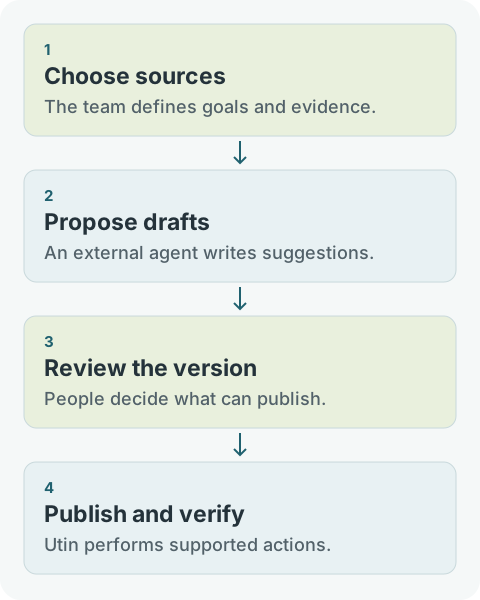
Assign each responsibility
| Task | Owner |
|---|---|
| Choose sources, audience and capacity | The team |
| Read approved sources and propose angles | External agent or human writer |
| Draft and flag claims needing verification | External agent or human writer |
| Check facts, rights, message and destination account | Named person in the team’s own review process |
| Perform supported publishing after a clear decision | Utin or an authorized API client |
| Verify publication and adjust the next plan | The team, optionally with external analytical help |
Work from one source
A fictional training provider has a page with three prerequisites and an explanation of course delivery. The agent may use only that page and a verified course outline.
A useful instruction could be:
Propose three Facebook or Instagram posts using these two sources. For each, provide the reader’s question, source passage, draft, suitable format and next step. Preserve qualifications. Do not invent outcomes, participant counts or testimonials. Flag anything that cannot be verified. Do not publish or schedule anything.
The team selects one post explaining prerequisites and another demonstrating a real exercise. It rejects a “guaranteed better project results” suggestion because the source does not establish that claim. Review has improved the plan before publication.
Make each draft reviewable
Attach a stable ID, source URL or document version, destination account and named owner. Preserve the exact reviewed copy. If the agent or writer changes a claim later, review that new version again.
Use the calendar template’s fields and statuses in the external process. “Ready” needs a fixed definition. It should not merely mean that a model finished writing.
Bound the automation
Start with suggestions without publishing access. After checking quality over several review cycles, consider a limited API workflow for cleared material. Follow the agent guides and API overview for supported actions and access.
- Give the agent access to the intended company and necessary tasks.
- Separate content work from ad budgets and access administration.
- Check account and post ID before a publishing action.
- Check the outcome before retrying so an ambiguous response does not cause duplicate publication.
- Stop the workflow when sources, offers or the accountable person change.
These are rules to implement in your external workflow. They do not describe a native autonomous calendar in Utin.
Measure more than draft volume
Track review time, drafts requiring factual corrections, cleared posts and relevant responses after publication. Large draft volumes add little if review effort increases equally.
Change the test when suggestions become repetitive, a source expires or the agent repeatedly makes unsupported claims. Do not automatically refill a queue solely to keep it full.
For manual planning, start with the content plan. Create a Utin account when you need supported publishing actions in a shared workspace.