
Social media operations

Meta Ads Management With Facebook and Instagram

Company workspacesOrganize accounts, conversations, campaigns and analytics by brand.
PublishingPrepare and publish content across the major channels your audience uses.
Paid campaignsManage Meta, Google and TikTok campaign work alongside organic activity.

Meta Ads management with organic social works better when the team can move from a real Facebook or Instagram signal to paid distribution without rebuilding the brand context. The post, audience response, ad account, budget and result should all belong to the same company workspace.

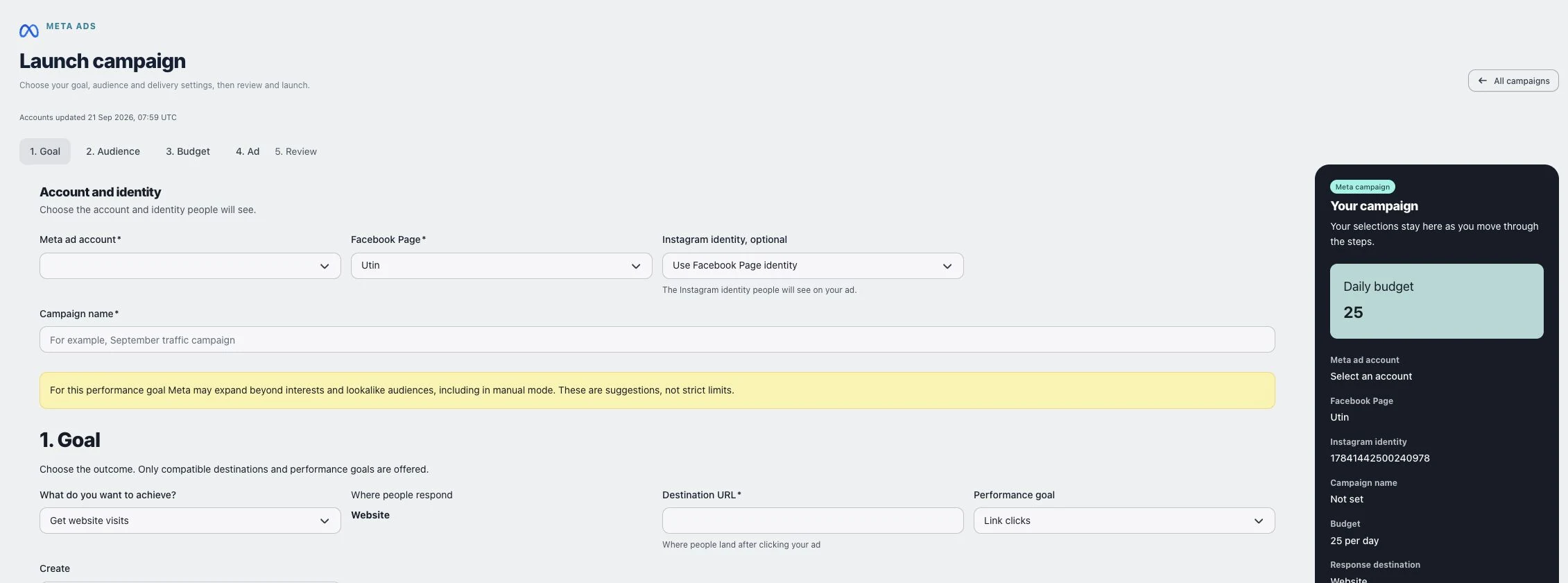
That is the operating model behind Utin’s Meta integration. It connects supported Facebook and Instagram publishing and community work with Meta ad account selection, campaign reporting, campaign controls and post boosting inside the relevant company workspace.

What the Meta Ads integration connects

AreaHow it works in Utin
Account setupConnect Facebook, then choose the Meta ad account that belongs to the company workspace
Organic sourcesSelect a recent post from a connected Facebook Page or Instagram account
Boost creationSet the budget, schedule, countries, age range and campaign options for the selected post
Campaign viewReview status, objective, impressions, reach, clicks, CTR, results, spend and daily budget when available
Campaign controlPause or activate campaigns, change supported daily budgets and remove campaigns
Wider workflowKeep publishing, supported conversations, Meta automations and ads attached to the same company workspace

The benefit is not merely a shorter route to Meta’s API. It is a cleaner handoff between organic work and paid work.

Turn a useful organic signal into a controlled boost

An organic post can earn attention for many reasons. The useful question is whether it reveals a message, offer or proof point worth distributing further.

A practical Facebook and Instagram boost workflow is:

  1. Publish a post tied to a clear business priority.
  2. Review the quality of comments, messages, clicks and other relevant responses.
  3. Choose a recent post from the connected Facebook or Instagram account.
  4. Set a daily budget, start and end time, location and age range.
  5. Create the boost in a paused state.
  6. Review the setup, then activate the campaign when it is ready to spend.

Starting paused creates a useful control point. A marketer can confirm the company, source post, dates and budget before distribution begins.

Utin also verifies that the selected post belongs to a connected account in the active workspace. That matters when several accounts are connected and a wrong-account boost would be more serious than an ordinary navigation mistake.

Keep the campaign beside the social media work

The usual fragmented workflow sends the marketer from a scheduler to Meta Business Suite, Ads Manager, an analytics tool and a separate report. Each move requires the team to remember which offer is active and which result belongs to which brand.

Utin keeps a shared campaign view inside the company workspace. Meta campaigns appear alongside connected Google and TikTok campaigns with a consistent set of operational fields:

  • provider and campaign name;
  • status and objective;
  • impressions, reach, clicks and CTR where supplied;
  • result label and count where supplied;
  • spend, currency and daily budget;
  • controls to pause, activate or adjust supported daily budgets.

This is deliberately an operational view. It helps a hands-on marketer see what is running and act safely without pretending that every advanced Meta setting should be flattened into a generic interface.

Connect Meta conversations and campaign decisions

Facebook and Instagram activity creates qualitative evidence that ad dashboards often hide:

  • a repeated question can expose missing landing-page information;
  • a strong comment can reveal language for the next ad angle;
  • direct messages can show whether the audience understands the offer;
  • a high-engagement post with weak commercial response can prevent an unnecessary boost;
  • a useful organic proof point can become the basis for paid distribution.

Utin’s wider workspace includes supported comments, Facebook and Instagram direct messages, Facebook reviews, and Meta comment-to-message flows, broadcasts and sequences. Keeping those signals close to campaign work makes the next paid decision better informed.

Read the wider guide to managing organic social and paid campaigns in one workspace for the full decision loop.

Unified does not mean identical

Meta, Google and TikTok do not use the same objectives, creative formats, billing logic or account structure. A useful unified platform should normalize routine operations while preserving provider-specific workflows.

Utin uses a common layer for reporting, campaign status, supported budget changes and account-level separation. Meta-specific work stays specific: Facebook and Instagram source posts, Meta ad accounts, boost targeting and Meta campaign rules remain part of the Meta workflow.

For a cross-channel comparison, see social media management with Meta, Google and TikTok Ads . The channel-specific guides explain Google Ads management alongside social media and TikTok Ads management with organic video and Spark Ads .

Use the public API when the workflow extends beyond the dashboard

Utin’s public API can expose connected ad account choices, create supported Meta boosts, return cross-provider campaign reporting and perform supported campaign status, budget and removal operations. This is useful when a team has a separate reporting process or wants to connect campaign operations to a wider delivery stack.

The same workspace and permission boundaries still apply. API access should extend the workflow, not create a second uncontrolled route around it.

Is the Meta integration a fit?

The Meta workflow is most useful when you:

  • publish and manage community activity across connected brands;
  • use Facebook or Instagram posts as inputs to paid distribution;
  • need a safer way to confirm the active company before changing spend;
  • manage Meta alongside Google or TikTok campaigns;
  • want campaign reporting and routine controls in the same operating view.

Utin is not presented as a replacement for every advanced task in Meta Ads Manager. It is designed to make the frequent operating loop clearer: observe, choose, boost, review and adjust inside the correct company workspace.

Join the Utin beta

Apply for beta access if unifying organic social and Meta Ads would reduce switching in your current workflow.

Utin beta

Apply with one email