
Before you start
You need Ads & Analytics permission in Utin and access to the ad account you want to use. Check that you have selected the right company, workspace and ad account.
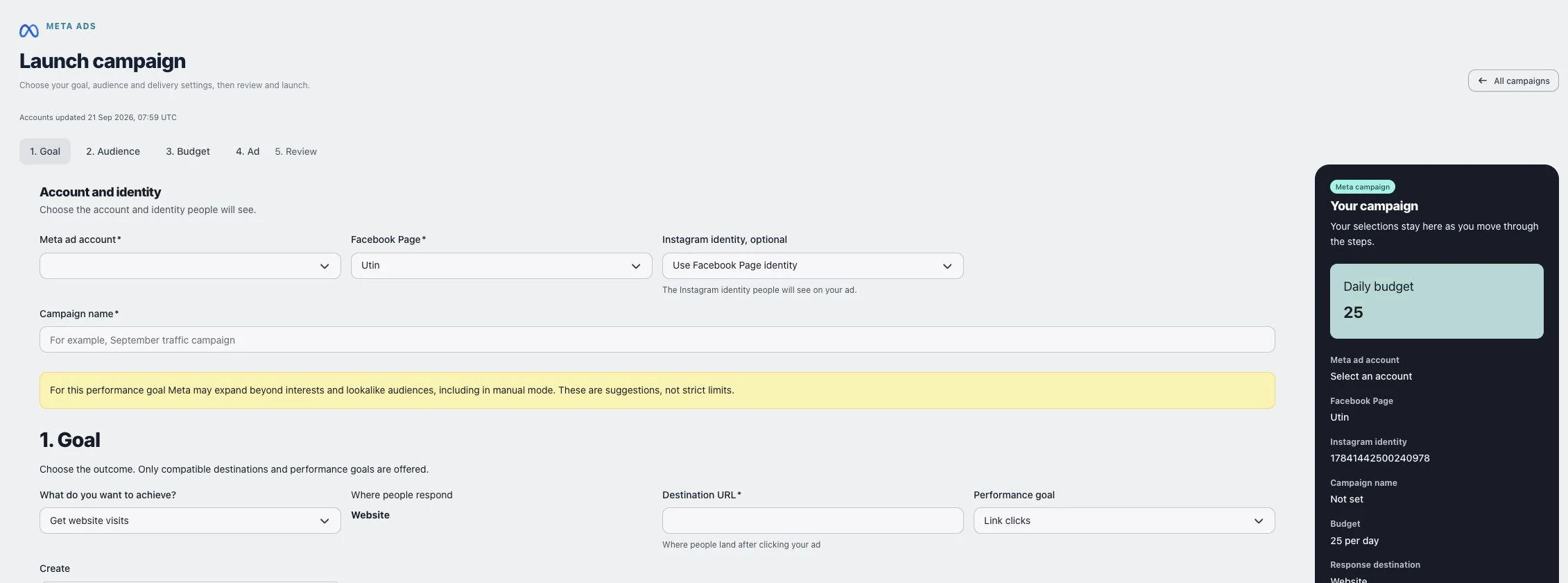
1. Choose account, identity and goal
Open Ads → Meta launch. In 1. Goal, select Meta ad account, Facebook Page and, if needed, Instagram identity, optional. Enter a recognizable Campaign name. The ad account determines the currency; the Page and Instagram identity determine who appears to be advertising.
Choose the outcome and Performance goal. The form changes with the destination: website campaigns need Destination URL, and conversion-based goals can require Pixel or dataset and Conversion event. An instant-form goal requires the appropriate signup form. If the form is missing, use Refresh signup forms after checking it in Meta. Do not choose a different event merely to bypass missing setup.
For a standalone campaign, leave Create at New campaign. The other choices add a new ad set to an existing campaign or a new ad to an existing ad set; those choices inherit parts of the existing setup.
2. Define the audience
Continue to 2. Audience. Under Locations, search for and select the intended places. Locations are combined: remove a country if you only want a city within it. Use Exclude locations for explicit exclusions.
Set Age and language. Languages are optional; leaving them empty includes all languages. Read the current audience-expansion notice: with Advantage, minimum age is a limit while maximum age and gender can be suggestions. Interests and included audiences can also be suggestions, depending on the goal. Excluded audiences remain exclusions.
Under Save or reuse an audience, use Saved audience → Apply selected preset to reuse settings, or provide Name for these audience settings → Save audience preset to save them. Inspect the applied locations and exclusions before continuing. Estimate audience estimates reach; it does not guarantee delivery or results.
3. Set the budget and delivery
In 3. Budget, choose Budget period deliberately. Daily budget is per day in the selected ad account’s currency. Total budget for a schedule uses Lifetime budget and requires an End time. Check the timezone shown in the start/end labels.
Use Share this budget across to choose Campaign or Ad set, where editable. Review Bidding and Placements. A bid or cost cap is required when that strategy is selected; automatic and manually selected placements have different constraints.
Check After creation carefully. Launch immediately requests active delivery after creation, subject to Meta’s checks. Create paused creates the campaign without requesting immediate delivery. Neither choice bypasses the final confirmation.
4. Add the creative
For a new creative, choose Ad source → New image or video in 4. Ad. Enter Primary text, Headline and any Description, optional, then check Call to action and the destination.
Upload Feed image or video. The form accepts JPG, PNG, WebP, MP4, MOV or WebM; provider validation still applies. Website campaigns can also use Stories and Reels media. Use the same media kind as the feed creative. Review the media and copy together so the promise in the ad matches the destination.
5. Review and confirm
Choose Review campaign. In Review and confirm Meta campaign, check account, identity, name, budget, response destination, creative, goal, conversion source, campaign structure, audience limits, bidding, placements and schedule. Read the activation notice.
Use Back to editing to correct a mistake. When ready, select the checkbox confirming the Facebook Page and Instagram identity and choose Confirm and launch. This final action creates the campaign and can allow spending when active delivery was selected.
Check the result
Open Launch history and follow the resulting record. A submitted or created campaign is not proof of Meta approval, delivery or spend. Confirm its final activation state in the campaign detail and Meta before assuming it is running.
If something does not work
Follow Finish setup or Review setup for missing approved identities or websites. For a missing conversion source or form, check access on the selected account and Page. European targeting can require beneficiary and payer defaults in Meta Ads Manager; follow the exact error rather than changing the audience accidentally. If creation has an uncertain outcome, inspect launch history and Meta before submitting another campaign.